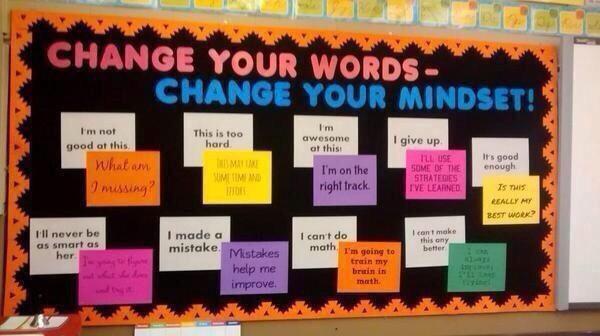
Mindsets, mind shifts, learning and the brain, Fixed vs Growth mindsets. Subtle but critical shifts in thinking. I came across this handy visual with thought suggestion shifts for students who get stuck in their mindsets:
As a professor (of social media no less), lectures are a normal mode of teaching, as distinct from our more active learning classroom processes K-12.
But he does a great job of explaining the challenges of maintaining attention and focus while being distracted with personal devices set up precisely to do just that.
I've pulled out a few quotes here, so except for {curly brackets mine}, these are Clay Shirky's words:
·Stay focused. (No devices in class, unless the assignment requires it.) ·Both the form and the content of a Facebook update are almost irresistibly distracting, especially compared with the hard slog of coursework. ·Humans are incapable of ignoring surprising new information in our visual field... ·Jonathan Haidt’s metaphor of the elephant and the rider is useful… the mind is like an elephant (the emotions) with a rider (the intellect) on top. The rider can see and plan ahead, but the elephant is far more powerful. Sometimes the rider and the elephant work together (the ideal in classroom settings), but if they conflict, the elephant usually wins. {especially in young people} · {...came to view students as ...} people trying to pay attention but having to compete with various influences, the largest of which is their own propensity towards involuntary and emotional reaction. ·Regarding teaching as a shared struggle changes the nature of the classroom. It’s not me demanding that they focus — it’s me and them working together to help defend their precious focus against outside distractions. I have a classroom full of riders and elephants, but I’m trying to teach the riders. ·...it’s me against a brilliant and well-funded army.... These {software/app/device} designers and engineers have every incentive to capture as much of my students’ attention as they possibly can, without regard for any commitment those students may have made to me or to themselves about keeping on task. ·The fact that hardware and software is being professionally designed to distract was the first thing that made me willing to require rather than merely suggest that students not use devices in class. ·Anyone distracted in class doesn't just lose out on the content of the discussion, they create a sense of permission that opting out is OK, and, worse, a haze of second-hand distraction for their peers. · ...not a switch in rules, but a switch in how I see my role. Professors are at least as bad at estimating how interesting we are as the students are at estimating their ability to focus. ·I’m coming to see student focus as a collaborative process. It’s me and them working to create a classroom where the students who want to focus have the best shot at it, in a world increasingly hostile to that goal.
This is primarily directed at lectures and seminar discussions, not the intentional and purposeful use of digital devices for learning and creating in our classrooms.
Using board-provided devices over personal devices may lessen a degree of distraction as they are not usually set up with the myriad of personalized social media plug-ins that constantly intrude.
Digital note-taking is also becoming a legitimately preferred mode for many (myself included), so we'll need to work extra hard to help our students block out distractions.
Perhaps some of them would like to read this article.
Just want to thank and applaud our amazing
students (SWAT team volunteers and more) who put together the new "projector carts"
for the remaining classrooms in the school. Amazing crew!
Thanks Ken, Irene, David, Phil, Andrew, Kevin & Kevin, Sameer, Jacob,
Alex and Joyce! Special thanks to Mrs. Flatman for organizing the classroom-needs list, Mr. Harvey for supporting and funding the project, Mr. Zambazis for his expertize, cables, locks, ethernet cords, and future troubleshooting, Ms Ferraro & Ms Oldham for coordinating and managing the orders, and to all others who have been advocating and problem solving all along. We're almost there!
We're having a great time adding all new purchases to our Pinterest boards, it gives a quick bright visual to browse through. Thanks for the idea Enid Wray, and thanks to Joyce, our ever-handy iHelp desk student volunteer doing most of the entries. Have a look!
And we're test driving a new "search tool" from google: What do you love? It's a fun way to quickly collect results in different categories. Try it!
Every year, a few thousand Ontario librarians converge on the Metro Convention Centre for our annual SuperConference, an intense 4 days of learning. This year, four Riverdale students accompanied us as "expert student forum panel members" to answer questions from 100+ school librarians.
Here's a sample, with Andrew Bradley articulately answering: "Think about how you find information online. What could schools be doing to help you sift through and know what is reliable in the information you find online?"
Students just blow me away every day.
We have taken the plunge into maker thinking with a 3D printer in the school library, available for anyone in the school. We have started out as an extracurricular club, with two of us staff-advising (thank you Mr. Le!) with the hope that as the students learn and refine the process they will be able to share tips with others. The students' first project has been to learn to design in a 3D digital program (originally SketchUp, but we may also to try TinkerCad, 123D, 3Dtin, and perhaps others) to create architectural scale models of the library furnishings in order to use them with a blueprint as we redesign the space.
It is a steep learning curve, it all still seems very "beta": the software (either for designing or printing) is not wrinkle-free yet, and not intelligent enough to discover (and announce or fix) gaps or geometric consistency errors in our designs that will goof up in the printer, but we have plowed on with new successes bit by bit.
It is super easy to print from a ready-made and tested design (ex. from Thingiverse, and some of our prints on the left),
but the real challenge is to design something of your own creation and have it successfully transfer and print.
While it is easy to joke about a pricey machine just to make 25 cent plastic doohickeys, that is of course not the point. The students are learning to think in 3D, learning new technologies, to design a 3D object in a 2D digital platform, to transform life size objects into proper architectural scale, to be at the forefront working in a medium that will be normal in a couple of years, to be a maker not just a consumer, to solve problems as they come up, to investigate, research, and test solutions, to be patient, to explore, that failure is part of learning, and success is all the sweeter when you've worked hard for it.
We are using a Makerbot Replicator 2X.
Here are a few of our discoveries:
Prints take a LOOOOOOONG time. We're not talking Star Trek replicators (yet!) A small object the size of a quarter may take 12 minutes, but anything larger, like this, can take almost two hours, and more solid objects can take many more hours.
You really have to be there and watch over the printing process. Don't just start it and walk away. Prints can fail at any stage and leave you with a big mess (the "blob" being one). Our first blob (which was supposed to be my house) fortunately only wrapped around the extruder metal heated parts so was easy to scrape off, but one poor fellow had to replace his extruder after an overnight blob crept up into the wiring. Blob vs. house:
Not everything sticks to the build plate (even with a raft) so you have to stop the build. We will play around with acetone on the kapton surface, heating the build plate a bit more, slowing the print. It would be nice if we could slow the beginning of the print then speed it up once established. The software is not sophisticated enough to allow that yet.
We had originally purchased the bot with the intention of using PLA plastic instead of ABS plastic for environmental reasons (PLA being a kind of sugar-based plastic, with a lower melt temperature, and fewer fumes). But after trial and error we discovered the 2X really isn't optimized for PLA after all. We were lucky enough to have only opened 2 spools of filament and could return and replace our other spools for ABS.
Our initial default prints (pre-designed and loaded in the Makerbot SD card) went fine, though we were disappointed to see little flaws in the final products (some threads of ABS don't seem as tight as they should be, some little blobs at the end of the M Token print, some rough surfaces). Such is the current state of the technology (at our price point).
The first student-designed item, a wrench, went quite well, though testing it at different profile resolutions (standard, high, low) gave confusing counter-intuitive results, we'll have to play with that more.
Sadly several of the next student-designed prints failed. They were simple objects, bookshelves, but the prints came out badly, with missing shelves, or shelves only partially completed and more. We have no idea why.
We were recommended (by Makerbot tech support) to run any of our .stl files through cloud.netfabb.com, and that has really helped "clean up" the files to successfully print. But we don't know why the translation from Sketchup to Makerware created such a poor prints in the first place.
We still don't quite get how to work with "shells" and what to do about them. Netfabb consistently reduces the shells in our files, and we can alter the number of shells in Makerware, but haven't learned enough yet why or when to do so nor what effect they will have. We're hoping it cleans up and tightens the prints.
I had a terrific Google+ Hangout session last night with two (new to me) twitter colleagues who are also integrating 3D printing with their programs, thanks @TeacherHann and @hdurnin!), it's a great way to pool our experience. We'll share a sample .stl file to print on each of our machines for comparison. Here are a few more tips to check that I learned from them:
be sure the build plate and nozzles are properly aligned and calibrated
check that "preheat the build plate" is in fact checked off in Makerware > make > advanced > temperature)
design everything as "components" in SketchUp to avoid gaps and errors
we might try cleaning the kapton (with acetone?), and slowing the prints for ones that don't seem to stick well.
We'd love to hear your experiences too, please add to the collective knowledge as we learn to integrate these new technologies!
Part of the Library as Learning Commons program is to provide a
venue for students to explore and be exposed to new ideas and technologies
they may otherwise not have access to. As such, the Library has acquired a MakerBot
Replicator 3D Printer, a small step into a "maker"
culture and philosophy. Basically it can slowly "print"
(create) three dimensional objects from PLA or ABS plastic filament. Here is our club as they set it up, and the first
item they printed (about the size of a quarter, took 15mns). Check out a
few links below for more info.
The 3D Club with Mr. Le will be working on an initial project
to design and replicate scale models of the library furniture to help with
re-designing the space.
I encourage anyone who wishes to learn about the system for
any potential class projects. We can imagine a host of subject-relevant
projects in Art, Sciences, Math, Business and more (how about locally
designed trophies or badges?). We will be asking club members to hold
demonstrations and workshops.
We will most likely be running it on a cost-back basis (the
material costs ~5 cents a gram). Generally the items will be small for
now (the bigger and denser the objects, the longer it takes and the more
material it uses). We will be opening it up for broader student use eventually:
they may submit applications to print designs they have designed themselves
(not downloaded pre-fab designs), or we may open contests (ex: design a
solution to a problem). Details will be worked out later.
From the executive summary: "Looking across
this range of experiences and settings, several key findings emerged. While
teachers are certainly aware of DI, many lacked a real understanding of what it
entails and how it might apply to their specific grade or subject. We also
found that in fact, most teachers were implementing DI strategies including
flexible grouping and choice in their classrooms (...) Misconceptions
surrounding DI, such as its incompatibility with senior academic classes, play
a role in this confusion.
(...) Some teachers also felt that in implementing
DI, they had experienced an increased workload and in fact had less time that
they have had previously. Certainly the greatest impediment to DI implementation
listed most often by all participant groups was time."
Two sites that do a nice job of pairing "apps" with purpose.
Student use:Do you
want students to create digital content? an ebook? images? videos? respond to
questions or poll the class? control a computer or smartboard? use ipads in
math? improve student organization?
TDSB is now a Google Apps for Educationcustomer. This means that our district has access
to all of Google’s Educational products and services at no cost with no ads, in
our own private and secure part of Google.Currently, TDSB is using a number of Google Apps
including Calendar, Drive, Contacts, Docs (word processing), Sheets
(spreadsheets) and Slides (presentations). Every TDSB student
and staff member has access to all these Google Apps through AW Academic
Workspace 3.0. More info: http://aw.tdsb.on.ca/sites/awresources/GoogleApps.aspx
Things students never say when using Google Docs:
A couple of useful add-ons for google docs:
TextHelp Read & Write
Just a reminder that all student computers have a program called Read
& Write (under Programs>TextHelp) which allows students to instantly
have any text on screen be read outloud.
For a simpler version: anyone can install the Chrome extension for
TextHelp to read contents of any Google Doc. Fewer features, but handy. Come
and see me if you'd like help with it.
Google Translate
Language learners can use google translate right inside a google doc to
help understand text.
(thanks to Karen Beutler, images cropped from her
slide show on google apps Blended Learning
with Google 2013)
ACL of Library, Learning Commons, and Digital Instruction and
Learning
Riverdale CI TDSB
“In some cases... we learn more by looking for the
answer to a question and not finding it than we do from learning the answer
itself.” Lloyd Alexander
· Riverdale Students now have TDSB email accounts. See AW for details http://aw.tdsb.on.ca, then My Home > Riverdale
· Access to School Shared folders for all staff and students, 24/7 from any device with an internet connection
· Create a School Announcement from an email
· Easier, quicker access to TDSB’S Google Apps for Education - Drive, Docs, Calendars, Contacts & more
· Share Google Docs outside of TDSB now
· View up to four Twitter feeds on every AW site.
AW home trick
in case you haven't found this shortcut yet: a super easy way to open AW from home (for announcements or access to your shared documents), just click on the link in on one of the Announcement Email Alerts we get when someone posts a new announcement. This skips all the tdsb.on.ca or mytdsb.on.ca logins.
If you don't receive those announcement email alerts, here’s how to set them up (they can be very handy to not miss news): when you are in AW, click View All Announcements, then Add Alert. You can do this for any AW site you'd like to hear updates about.
TACKK.COMa new instant “website” creation tool. A simple way to present information online in a colourful dynamic way, instantly add text, photos, media. No need to create accounts (though a free account keeps tackks indefinitely). ex: http://tackk.com/psab1a
Anne Baird reminds us about Goodreads.com. "some of the reviews are better written than the books themselves!" She's been ordering books to read based solely on their recommendations.
Want to join a Canada-wide book conversation? The Canada Reads panel
discussions February 11, 12, 13 and 14th may be an inspiration. Go to the Canada Readsweb site to check out
the five contending titles, or join the Twitter book club @cbcbooks
#CanadaReads2013. This is a great opportunity to be part of a larger reading conversation
focused on Canadian literature, even though it can be difficult to find the
time for personal reading.
Students can record themselves easily with many simple free tools
(Audacity is installed on all TDSB systems, we have microphones in the
library). The .mp3 podcasts can then be simply dropped in your DropOff folder,
or can be published online for more sharing options.
If you haven't yet noticed, Google search has a new tab category:
Applications. It will search for apps by topic (all platforms).
A few apps that let you use your mobile device to control your home
computer, from anywhere. I have tried each of the following. Some are free,
some charge a fee up front, some annually. Come and see me for a demo if you
wish.
With several incarnations over the decades, and the essential question
of whether the "lower" levels are necessary before the
"higher" levels in learning activities, this latest version of
Bloom's Taxonomy provides some practical categories of thinking activities that
students engage in with different learning technologies.
http://studentchallenge.edublogs.org/: “The Student
Blogging Challenge runs twice yearly, …March and September, each year. It is
made up of a series of 10 weekly tasks all designed to improve blogging and
commenting skills while connecting students with a global audience. The
Challenge is open to both class blogs and to individual student bloggers from
all over the world and of all ages…”
KidBlogs offers a very controlled blogging platform
for classrooms, students do not have to create accounts
and you can manage and edit entries. See me if you would like help setting one
up.
Here is a 1.5mn video showing some of the features of Google Docs, which
TDSB students and staff have protected access to with AW: http://www.udemy.com/googledriveeducators/.
Great for collaborating, but also for commenting on works in progress.
We encourage students to use the online apps that create citations
automatically (allowing students to focus more on content and logic than
technical details). EasyBib, Citation Machine, BibMe to name a few. Some will even scan a
barcode using your mobile device to create the entry.
But they do have flaws:
They don't always recognize when a word or proper name is to be
capitalized;
APA now includes an extra identifier called a DOI. If you see one in a
student reference list, it is not incorrect (the DOI refers to the Direct
Object Identifier for online resources, primarily journal articles, but the
online systems may add DOIs to other sources when they find one).
Students still need to edit spelling, and format double spacing and
hanging indents correctly.
Useful for flipped lessons, and you don't have to be on camera! These
tools let you 'record' what your computer screen is doing (so you can
demonstrate anything online). You record your voice on top for instruction.
Not new,
but worth a reminder that the Virtual Museum of
Canada is a great source of images that represent Canada's arts, culture,
science and history. Over 600 virtual exhibits are provided and a Teacher's
Centre provides lessons. Visit museums from all across Canada from the comfort
of your desktop! Thanks http://ramott.wordpress.com/2013/01/30/virtual-museum-of-canada/